Friday, January 25, 2013

How to run Servlet program in Eclipse - Java Servlet Example - What is a Java Servlet - Servlet Tutorials, web.xml in servlet


How to run Servlet program in Eclipse - Java Servlet Example - What is a Java Servlet - Servlet Tutorials, web.xml in servlet


Hello and Welcome in Servlet Tutorials Section of this Blog.....


First of all i will tell you about, what are the Java Servlets---- The Java Servlets are the java classes which are executed in Web Server or In Other words the Java Servlet is used to generate Dynamic pages in Websites. The java Servlets receive the request from the clients which are basically the Web Browsers and generate the response according to their need.


The Format of a Java Servlet is follows--


import java.io.PrintWriter;

import javax.servlet.*;
import javax.servlet.http.*;
public class MyServlet extends HttpServlet
{
     public void doGet(HttpServletRequest request,HttpServletResponse response)
      {
         response.setContentType("text/html");
         PrintWriter out=response.getWriter();
         out.write("Hello Servlet");
      }
        public void doPost(HttpServletRequest request,HttpServletResponse response)
      {
           response.setContentType("text/html");
          PrintWriter out=response.getWriter();
         out.write("Hello Servlet");
      }

}


In above Exmple I have used 2 methods doGet() and doPost(), The only one method will be executed when this Servlet will be called because the client can only be send the request with only one method whether it is GET or whether it is POST some of the methods are available but those are rarely used so we will discuss about those methods later.


Lets come to the next section of this tutorial, How to run a java Servlet program in Eclipse IDE with one client and a java servlet.


Step 1- In Eclipse IDE choose the New option from toolbar and go to other and then go to the web and then click on Dynamic Web Project then give it to a suitable name and make sure there will be the Target Runtime set as Apache Tomcat v6.0 or other and the Dynamic web module version 2.5. and then finish


Step2- After creating the blank project right click on your project and make a new HTML File and give it the name index.html and the content of this file like this


<!DOCTYPE html PUBLIC "-//W3C//DTD HTML 4.01 Transitional//EN" "http://www.w3.org/TR/html4/loose.dtd">

<html>
<head>
<meta http-equiv="Content-Type" content="text/html; charset=ISO-8859-1">
<title>Insert title here</title>
</head>
<body>
<form method="GET" action="table">
Enter a Number<input type="text" name="num"><input type="submit" value="Table">
</form>
</body>
</html>


And you can change the content of the index.html file according to your requirement


Step 3- Now Create a Servlet file by right clicking on your project and select New--> Other..--->Web-->Servlet.


The content of the Servlet file like this...


package W3STutorial;


import java.io.IOException;

import java.io.PrintWriter;

import javax.servlet.http.HttpServlet;

import javax.servlet.http.HttpServletRequest;
import javax.servlet.http.HttpServletResponse;

public class PrintTable extends HttpServlet {


public void doGet(HttpServletRequest request,HttpServletResponse response) throws IOException
{
response.setContentType("text/html");
PrintWriter out=response.getWriter();
int num=Integer.parseInt(request.getParameter("num"));
for(int i=1;i<=10;i++)
{
out.print(i*num+"<br>");
}
}

}


You can change the content of the PrintTable according to your requirement.


Step 4- Now We need to change the web.xml content which is available under the WEB-INF directory on your Project so the web.xml content should be as follows.


<?xml version="1.0" encoding="UTF-8"?>

<web-app xmlns:xsi="http://www.w3.org/2001/XMLSchema-instance" xmlns="http://java.sun.com/xml/ns/javaee" xmlns:web="http://java.sun.com/xml/ns/javaee/web-app_2_5.xsd" xsi:schemaLocation="http://java.sun.com/xml/ns/javaee http://java.sun.com/xml/ns/javaee/web-app_2_5.xsd" id="WebApp_ID" version="2.5">
  <display-name>FirstWebExample</display-name>
  <servlet>
  <servlet-name>PrintTable</servlet-name>
  <servlet-class>W3STutorial.PrintTable</servlet-class>
  </servlet>
  <servlet-mapping>
  <servlet-name>PrintTable</servlet-name>
  <url-pattern>/table</url-pattern>

  </servlet-mapping>

  <welcome-file-list>
    <welcome-file>index.html</welcome-file>
  </welcome-file-list>

</web-app>


Now your project is ready to deploy


Step 5- Right click on your project and choose Run As -->Run On Server-->Choose your Server and finish then your index.html page's content will be shown on browser.


and pass the some value on your textbox like 12 and click on Table and then the output will be shown as follows

12
24
36
48
60
72
84
96
108
120

If the above example is helpful for you then please give your comments and advise.

Thanks


Thursday, January 24, 2013

Spring Framework Tutorials for Beginners, Spring Framework Step by Step, Hello World Example in Spring Framework with Eclipse, web.xml in Spring Framework


Spring Framework Tutorials for Beginners - Spring Framework Step by Step, web.xml in Spring Framework.


Hello World Example in Spring Framework with Eclipse

Hello and Welcome to all who are new in Spring Framework. I am going to give a quick overview about spring framework and how to make a simple Example like "Hello World" Example......

I am Using Eclipse IDE for this example and we need the Spring Framework JAR's from so download these JAR's from spring official site and Apache commons-logging-1.1.1-bin.zip  from apache official site.

Now First we have to create a new Project in Eclipse IDE. Click on  New from Toolbar --> Other..-->choose Java Project.


Give it a name like HelloWorld.
click on finish button.

then first we want to add the external Spring JAR's which we have downloaded in first step. right click on your HelloWorld project select properties like this


then the property window will appear like this and choose java build path
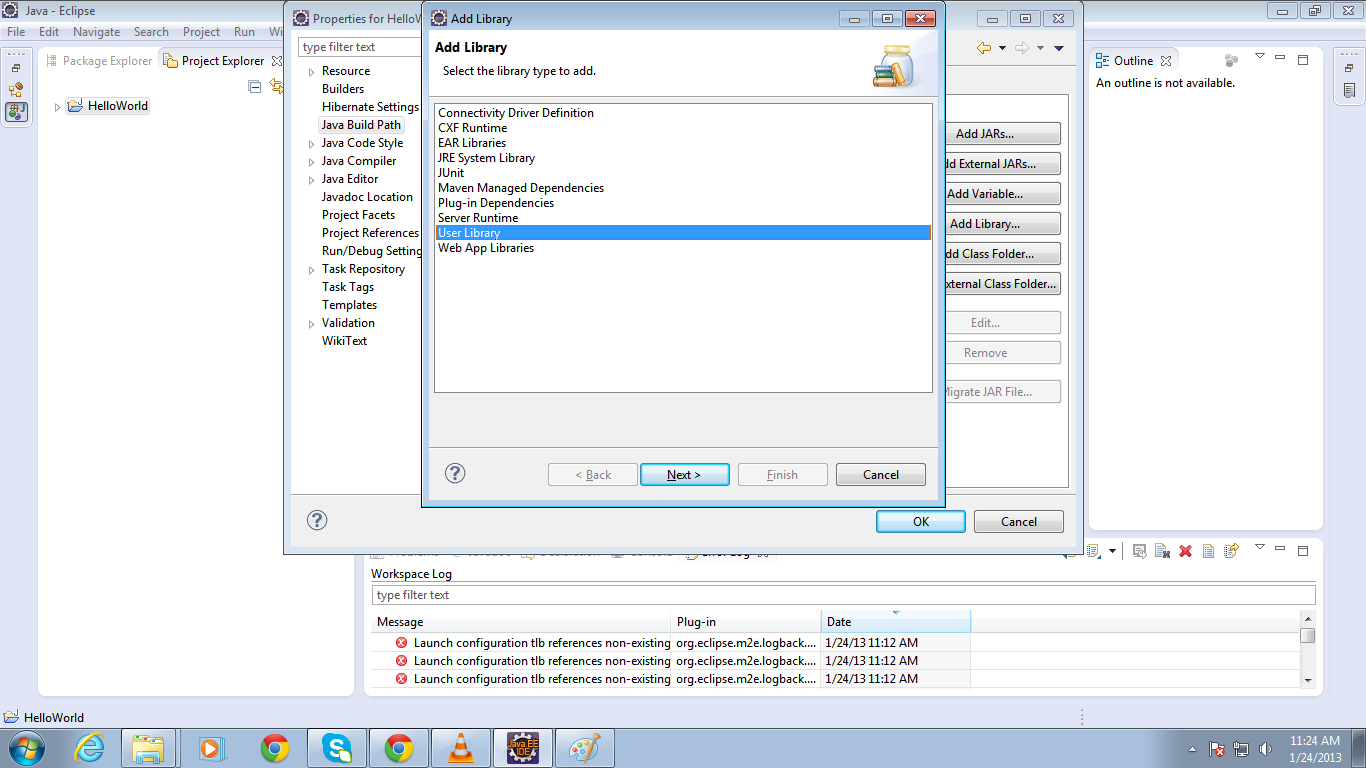
then click on Libraries tab then click on Add Library then the Add Library window will appear then choose User Library like this


click on Next then click on User Libraries then a User Libraries window will appear.


then click on New then a new window will appear with the name New User Library give it a name like Spring like this.


then click on Ok then click on Spring Liabrary which is appear now in your User Libraries then click on Add External JAR's then select the downloaded JAR's form your Computer's drives like this
first we will add the Spring JAR's from lib folder under the spring-framework-3.2.0.RELEASE


Select all JAR's from there and open them then the all JAR's will be available under the Spring Library
 then again add the Apache commons.logging JAR like this


Select the only one JAR commons-logging-1.1.1 from commons-logging-1.1.1 folder which you have downloaded in first step.
Now you are ready to develop a Spring project Now right click on your project HelloWorld then click on New -->Class


then give a name to your Class and give package name as well like this 


I have given the package name W3STutorial and Class name HelloWorldExample
Now create a new class by the name Message under the W3STutorial the code for each class are as follows.....


HelloWorldExample.java

package W3STutorial;


import org.springframework.context.ApplicationContext;
import org.springframework.context.support.ClassPathXmlApplicationContext;

public class HelloWorldExample {

public static void main(String[] args) {
ApplicationContext context=new ClassPathXmlApplicationContext("spring.xml");
Message message=(Message)context.getBean("message");
message.showMessage();

}


Message.java


package W3STutorial;

public class Message {
private String msg;

public String getMsg() {
return msg;
}

public void setMsg(String msg) {
this.msg = msg;
}
public void showMessage()
{
System.out.println(msg);
}

}


then Create a XML file like this....... right click on src folder under your project and click on New-->Other...-->XML-->XML File and then Next and give it a name Spring.xml.....


under the Spring.xml write this code...

<?xml version="1.0" encoding="UTF-8"?>
<!DOCTYPE beans PUBLIC "-//SPRING//DTD BEAN 2.0//EN"
    "http://www.springframework.org/dtd/spring-beans-2.0.dtd">
    <beans>
    <bean id="message" class="W3STutorial.Message">
    <property name="msg" value="Hello Wold"/>
    </bean>
    
    
    </beans>


Now your first Spring project is ready to Run this Project right Click on your project and then Run As then click on Java Application like this


 if everything is Ok then your project run successfully the message shown as follows


the Hello World Message show in bottom of your IDE...


So I wish now you are ready to make your first Spring Project if you want to know more about Spring then post your comments here.
All the Best


You Might Also Like


Tuesday, January 22, 2013

Defination List in HTML - How to create a Defination in HTML


Definition List is used to create a paragraph of definition into a web page like a paper we are creating several type of definition of define many kind of topics by providing their Title and Description.
The Defintion List(DL) help a programmer to give same functionality like as a definition on paper...

Example:- 
<html>
<body>
<DL>
<DT>WWW</DT>
<DD>The term WWW refers to the World Wide Web or

 simply the Web. The World Wide Web consists of all

the public Web sites connected to the Internet 

worldwide, including the client devices (such as 

computers and cell phones) that access Web 

content.

 The WWW is just one of many applications of the 

Internet and computer networks.<DD>

</DL>

</body>

</html>
Saturday, January 5, 2013

What is the use of DIV tag in HTML - Difference between ID and Class Selector in HTML


What is the use of DIV tag in HTML - Difference between ID and Class Selector in HTML

DIV tag is used to make a section or a block on web page. It is the very frequently used tag for designing websites and templates.It is access in CSS by providing selectors ID and Class or both. 

ID can be access in CSS by using (#) symbol and class is access in CSS by using (.) symbol.

Difference between ID and Class:-
                                                      ID is used to give a unique identity to a tag and Class can be multiple for a tag.

Example:-
<html>
<style type="text/css">
div
{
      background:red;
      color:blue;
}
<body>
<div>this is the DIV </div>
</html>


Tuesday, January 1, 2013

DD Tag in HTML - How to make a Definition List in HTML


<DD> Tag in HTML - How to make a Definition List in HTML

The <DD> tag or Definition Data is used to define the Data of a Definition list. It is define the definition of a title which defined in <DT> or Definition Title.

Example:-

<DL>
<DT>WWW</DT>
<DD>The term WWW refers to the World Wide Web or 

simply the Web. The World Wide Web consists of all 

the public Web sites connected to the Internet 

worldwide, including the client devices (such as 

computers and cell phones) that access Web content.

 The WWW is just one of many applications of the 

Internet and computer networks.
<DD>

</DL>

Colgroup in HTML Table - How to make columns group in Tables in HTML


<Colgroup> in HTML Table - How to make columns group in Tables in HTML

The <colgroup> Tag is used to make the columns group in HTML Tables. Basically it is used to combined 2 or more columns in a group and specify the same layout like color, bgcolor etc for the column group.
The span property of a <colgroup> specify the how much columns you want to combined.

Example:-

<table>
<colgroup span="2" bgcolor="green"></caption>
<tr>
<th>Roll No.</th>
<th>Name</th>
<th>Course</th>
<th>Address</th>
</tr>
<tr>
<td>1001</td>
<td>Talib</td>
<td>MCA</td>
<td>Undefined</td>
</tr>
</table>

Caption tag in HTML Tables - How to give a title for a table in HTML


<Caption> tag in HTML Tables - How to give a title for a table in HTML

The Caption Tag is used to give a title to a Table in HTML. It defines the caption of a table by defining text between <caption></caption> tags.

Example:-

<table>
<caption>Student Info</caption>
<tr>
<th>Roll No.</th>
<th>Name</th>
<th>Course</th>
<th>Address</th>
</tr>
<tr>
<td>1001</td>
<td>Talib</td>
<td>MCA</td>
<td>Undefined</td>
</tr>
</table>

Button Tag in HTML - How to make a button without input tag


<Button> Tag in HTML - How to make a button without input tag

The Button Tag or<button> tag is used to make a clickable button in HTML without using the <input> tag.
The only one difference between button tag and button specified by input tag is you can place content like text and images both by <button> tag but input tag only support text.

Example:-

<button type="button">click me</button>

Br Tag in HTML - How to give line break in HTML


Br Tag in HTML - How to give line break in HTML

The BR or <br/> tag is used to give a line gap in HTML Document.
The br tag is also known as break tag, it give a line break after the text.

Example:-

<body>
Name<input type="text"><br>
Roll No.<input type="text"><br>
<input type="button">
</body>

Body Tag in HTML - What is body tag in HTML


Body Tag in HTML - What is body tag in HTML

The Body Tag is used to place the contents in a document such as from elements, hyperlinks, labels, buttons, images etc.
The body tag do not have any required attribute and it helps to make default background color and default font color for all document by specifying bgcolor and text properties.

Example:-

<body>
<form>
Name<input type="text">
Roll No.<input type="text">
</form>
<img src="favicon.png">
</body>

Blockquote Tag in HTML - What is the Use of Blockquote tag in HTML


Blockquote Tag in HTML - What is the Use of Blockquote tag in HTML

The Blockquote or <blockquote> tag is used to make a quotation for any particular field of any company or organization for defining their goal.

Example:-
<blockquote cite="http://w3stutorial.blogspot.com">
This blog has created for helping the students or new programmer in various topics like java,jsp,HTML,javascript,CSS,Ajax, JSON, Java Frameworks, asp.net and many more...</blockquote>


Big tag in HTML - How to make Big Text in HTML


Big tag in HTML - How to make Big Text in HTML

Big or <big> Tag is used to define big text in your web page. It similar to the bold or <b> tag but it used to make little big text as compare to <b> tag.

Example:-

<big> This is bigger text</big>

Basefont tag in HTML- what is the use of basefont tag in html


Basefont tag in HTML- what is the use of basefont tag in html

Basefont or <basefont> tag is used to set default font color, size and font family to all text of a web page.

Example:-
<head>
<basefont color="blue" size="6"/>
</head>
<body>
<div> this is a DIV tag</div>
<span>This is span tag</span>
</body>
</html>

Conditional Statements in PHP - PHP if else if with Example


Conditional Statements:-

In every program you need to perform different actions for different tasks so you need to use the conditional statements to do these type of actions.

In PHP there are several types of conditional statements.

if statements:- if statement is used to execute some code inside the if block, if the specified condition is true then the code will be execute otherwise the code never execute.

Example:-

<?php
$x=0;
if($x>0)
{
echo $x;
}

?>

if else Statements:- if else statement is used to execute some code inside the if block, if the specified condition of if block is true then the code will be execute otherwise the else code should be execute.


Example:-

<?php
$x=0;
if($x>0)
{
echo "Hi";
}
else
{
echo "Bye";
}
?>

if else if Statements:- if else if statement is used to execute some code inside the multiple choice if blocks, the compiler checks all conditions till its not find the true statement, if a true statement is found the compiler does't check next if statements and if all condition are false then the else condition should be execute.


Example:-

<?php
$x=0;
if($x>0)
{
echo "Hi";
}
else if($x==0)
{
echo "Bye";
}
else
{
echo "Wrong choice";
}
?>


Base Tag in HTML- How to set all links target with a common tag, What is the use of Base Tag in HTML


Base Tag in HTML- How to set all links target with a common tag, What is the use of Base Tag in HTML

The Base Tag is used to set a common URL to all the links specified in a web page. If we want to set all links will open in new window then we have to define it in <base> tag.

Example:-

<head>
<base href="w3stutorial.blogger.com" target="_blank"  >
</head>
<body>
<a href="w3stutorial.blogger.com">click to open this in new tab or window</a>
</body>
</html>

in above example there is no target attribute define in <a> tag but this link will open in new window or tab.

Bold Tag in HTML, How to Make Bold Text in HTML


Bold Tag in HTML, How to Make Bold Text in HTML

The BOLD or <b> Tag is used to make the Bold Text in a web Page.
The entire text which is enclosed with <b></b> tag is resulted as a bold text on Web page.

Example:- 

<b>This is Heading</b>  

Area Tag in HTML- How to make a shape and display content into it in HTML


Area Tag in HTML- How to make a shape and display content into it in HTML

The Area Tag is Used to make a specific area on Web Page inside an image-map by specifying its co-ordinates and we can use this area to show any type of content in that area including a web page.

Attributes of area tag:-

Shape:- This attribute is used to define the shape of area like rectangle, circle etc.

Coords:- This Attribute is used to set the coordinates of a given shape.

Href:- This Attribute is used to define a new page or new shape URL which is open when we click on that particular area.

Example:-
<img src="accesories.html" height="400" width="500" usemap="#map1"/>
<map name="map1">
<area shape="rect" coords="10,10,40,40" alt="Keyboard" href="keyboard.htm">
<area shape="rect" coords="10,80,40,40" alt="mouse" href="mouse.htm">
<area shape="rect" coords="80,10,40,40" alt="LCD" href="LCD.htm">
</map>


Applet Tag in HTML-How to Run a Java Applet Application on Browser, How to Run a Java program on Browser


Applet Tag in HTML-How to Run a Java Applet Application on 
Browser, How to Run a Java program on Browser

Applet Tag is used to run a Java Application on Browser. It is used to deploy a Java Class which is Compiled by Java Compiler and that Compiled class is executed by Applet tag. It has some attributes to run a Java Class.
Attributes in Applet Tag:-

Code:- The code Attribute is used to write a Compiled java class in Applet Tag.
Ex:-
<applet code="calculator.class"></applet>

Height:- The Height Attribute specify the vertical length of the Java Application on Browser.
Ex:- 
<applet code="calculator.class" height="500"></applet>

Width:- The Width Attribute specify the horizontal length of the Java Application on Browser.

Note:- Some browser do not support the Applet tag like google chrome these browser need to install an additional plug in to run a java applet code on browser.  

What is the use of Address Tag in HTML, How to write address in HTML


What is the use of Address Tag in HTML, How to write address in HTML

Address Tag is used to create an Address Block of an organization, company or Home. It is very useful tag for separating the address in a section.

Example:-

<address>
Permanent Address
Thomas Nolan Kaszas II
5322 Otter Lane
Middleberge FL 32068
</address>